
Make the fragmented work visible
Investigation, workshops, and a service blueprint connected tools, teams, and handoffs.

 Email
Email
 SonderMind2026
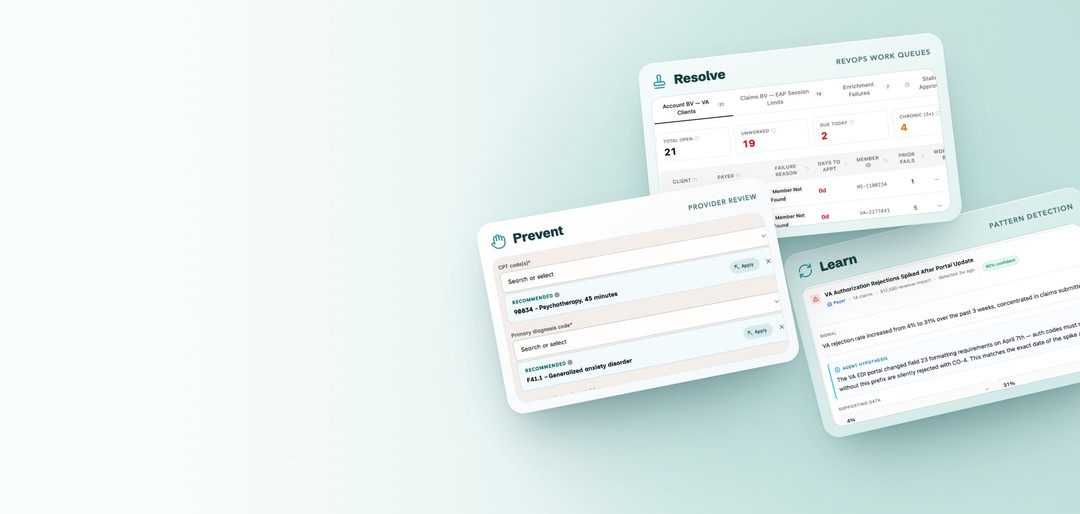
I mapped how claims moved across teams and tools, aligned everyone on who should fix what, and designed multiple sides of the service, including AI code recommendations that help providers get claims right before submission, and a new admin portal where RevOps resolves what still gets through.
AI drafts the billing codes from the session transcript; the provider confirms them before submitting. Reached dev handoff.
90834 – Psychotherapy, 45 minutes
Investigation, workshops, and a service blueprint connected tools, teams, and handoffs.
Care coordination and RevOps workflows informed queues, responsibilities, and handoffs.
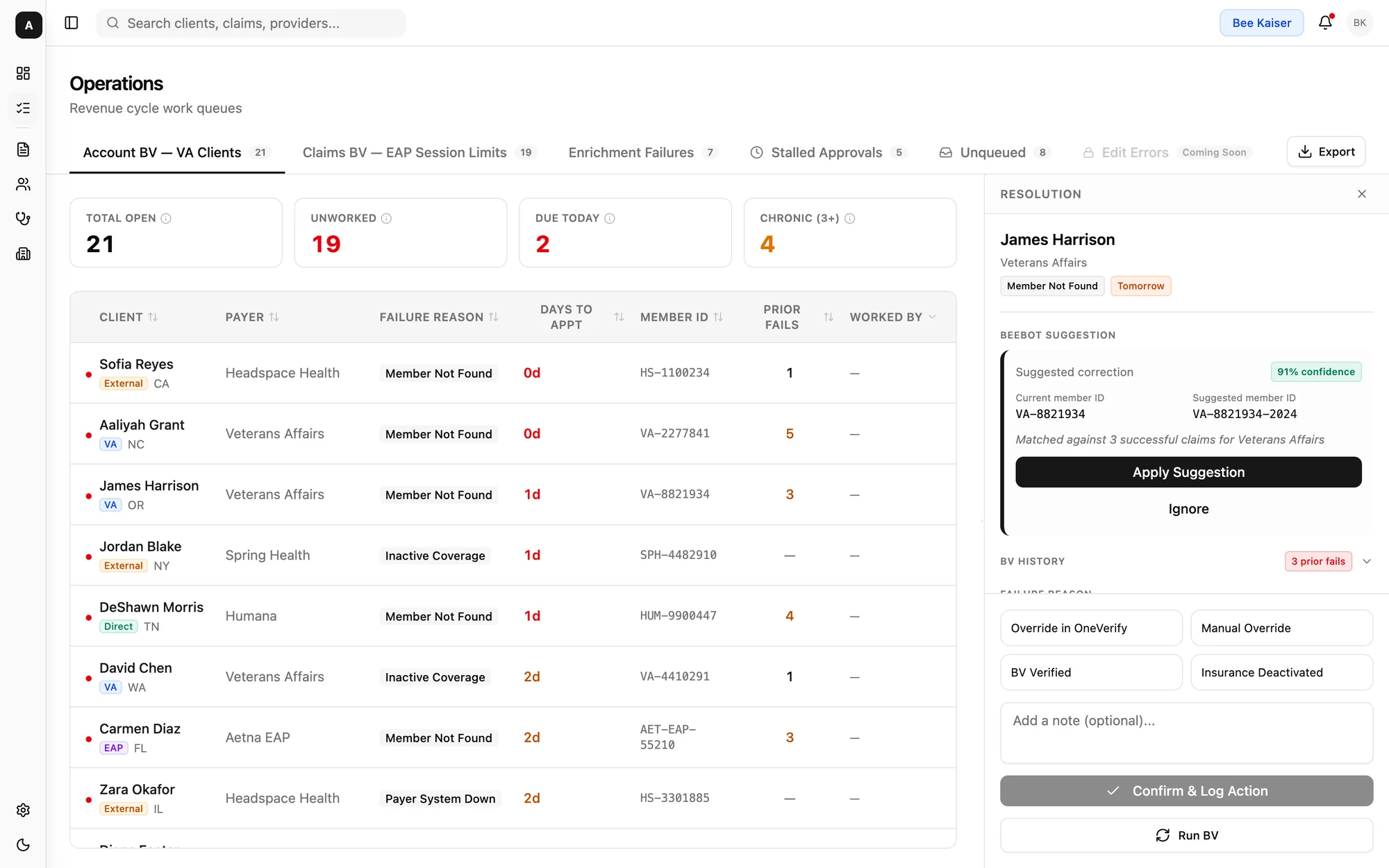 See the work-stream queues ↓
The brief review aligned teams on the work and milestones. Engineering clarified what the service could support.
See the capability review ↓The intelligence proposal explored shared causes and rules that people would review before use.
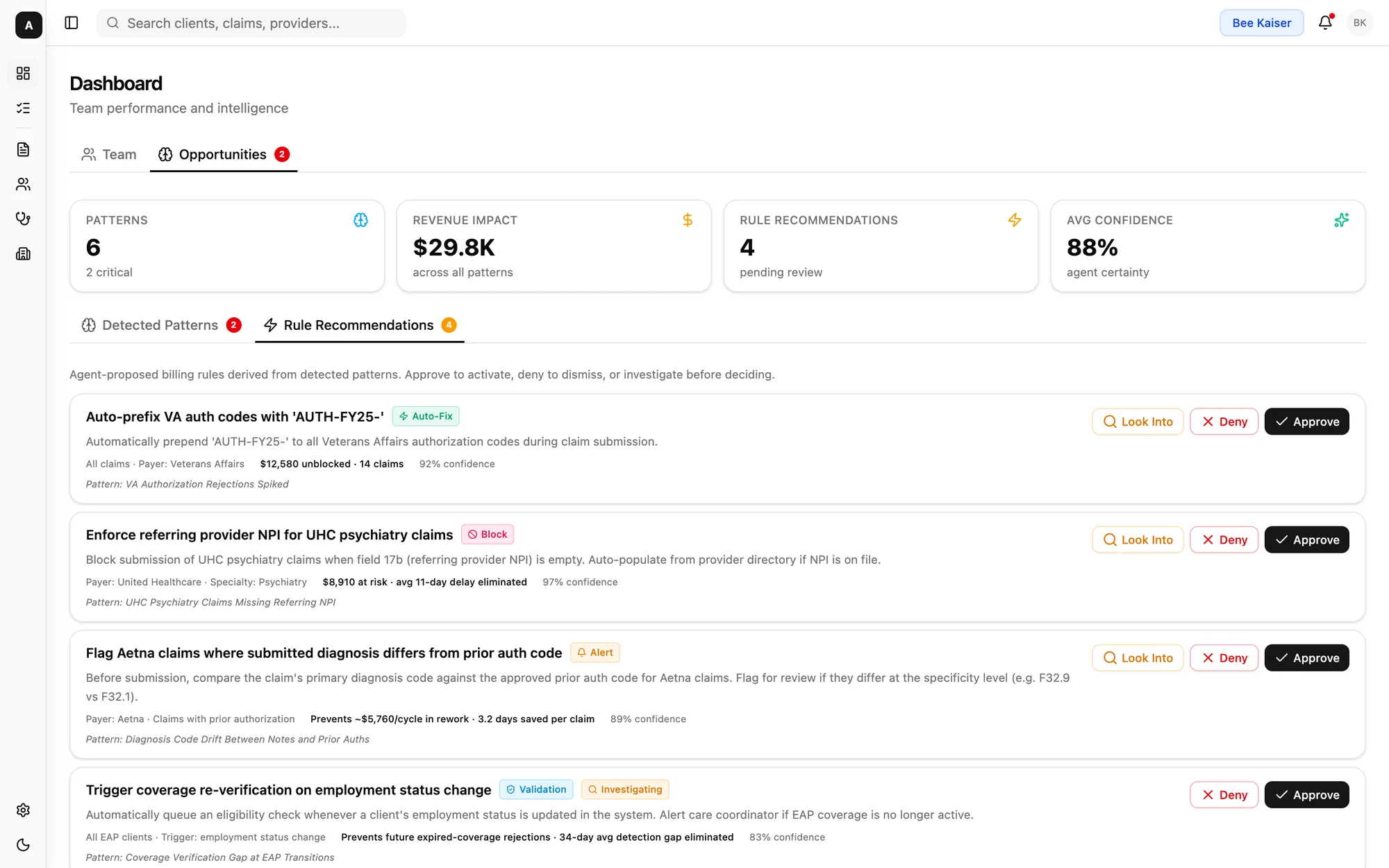 Proposal · see the rule review ↓
An insurance claim requests payment for a therapy session. SonderMind paid providers on submission, before the insurer paid the company. Unresolved claims left the business covering those payments while RevOps worked to recover the revenue.
Manual investigation consumed team capacity and cost the company time and money. Providers were frustrated, clients waited for corrections, and RevOps had to balance claim issues with its other responsibilities.
42,000
8
$100Ks
To correct a claim, RevOps had to assemble its story across reports, vendor portals, and client records. The route varied by issue; the context was scattered.
5–15 min
7

Engineering was planning a new claims service. I started from one question: how could that rebuild help the people responsible for getting claims paid, and address the fragmented work RevOps faced?
No one team could see the whole claim: RevOps, care coordination, engineering, and partnerships each held one piece, in their own tools and vocabulary. I interviewed each team, traced how a claim moved across systems and handoffs, and mapped it into one service blueprint. With no dedicated PM, I used it to connect operational findings to engineering’s plan, then ran workshops that got the teams to agree on the gaps and what to tackle first.
About eight specialists worked a backlog of tens of thousands of claims from Looker exports and shared spreadsheets, updating status and notes by hand. There was no shared view of what was worked, how, or what it recovered. In research, the team was clear that different kinds of work needed different queues: benefit verification and claims collection were “completely different” workflows, so a single failed-claims list would hide those differences. Finding the claim was only the beginning. Specialists needed to know what work it required—and have the context to act.
| A | B | C | D | E | F | G | H | I | |
|---|---|---|---|---|---|---|---|---|---|
| 1 | Claim ID | Client | Payer | DOS | Billed | Issue | Assigned | Status | Notes |
| 2 | CLM-10482 | Placeholder, R. | BCBS (MA) | 09/02 | $185.00 | Member not found | Spec. A | Worked | verified ID, resubmitted |
| 3 | CLM-10497 | Sample, J. | Aetna (CO) | 09/03 | $142.50 | Auth missing | Spec. B | Pending | need auth # from provider |
| 4 | CLM-10511 | Mockley, A. | Kaiser (CA) | 09/04 | $210.00 | Not in network | |||
| 5 | CLM-10523 | Demo, D. | Optum (WA) | 09/04 | $185.00 | Invalid DOB | Spec. A | Worked | DOB typo, fixed |
| 6 | CLM-10530 | Testwell, L. | Cigna (NY) | 09/05 | $95.00 | Timely filing | Spec. C | Pending | appeal? check w/ lead |
| 7 | CLM-10544 | Fakerson, J. | Humana (GA) | 09/08 | $142.50 | Payer rejection | dup of 10497? | ||
| 8 | CLM-10552 | Example, R. | BCBS (TX) | 09/08 | $185.00 | Inactive coverage | Spec. B | Worked | client updated insurance |
| 9 | CLM-10561 | Dummyton, S. | Aetna (CO) | 09/09 | $210.00 | Member not found |
The research pointed to three connected questions: who should act, how much the experience should change, and what data it could rely on.
Engineering was already building the new claims service, but nothing yet connected it to the people who’d have to work claims through it, and there was no PM to make that link. My proposal had two goals: to show the full picture of what it would look like to address the issues along the whole claims flow, from submission through resolution, rather than one stage at a time; and to get engineering, RevOps and the provider pod to agree on one direction before anything was built. The proposal presentation aligned the broader team on what needed to happen and gave everyone a shared view of the milestones. With that agreement in place, I focused the team on three commitments we held every design to.
I proposed the split · We agreed team responsibilities
A faster admin queue would still leave RevOps fixing errors that could have been caught earlier. I framed the work as two separate responsibilities: prevention, catching errors providers can fix before a claim is submitted, and resolution, RevOps working the exceptions that still get through. I ran a cross-pod session to split them: the provider pod took on building and managing prevention, and I designed both experiences.
I compared the options · I chose the simple fix with engineering
The provider team had recently just finished redesigning submission, and a broader review experience would have meant another heavy round of implementation and validation. Working with engineering, I made a strategic call to keep it simple: a focused suggestion inside the existing flow, with one explicit provider decision and one attestation step. That saved the team’s bandwidth and energy instead of spending it on a second redesign.
The provider searched for and picked every code alone.
90834 – Psychotherapy, 45 minutes
A suggested code drafted from the session note: one decision, apply or dismiss.
Build adjustmentDuring build, an engineer and I moved from using the progress note to using the session transcript to generate codes. Generating from the note relied on the enrichment system, which would have layered significant change onto the recently redesigned claims service, a launch that was performing well. The team was understaffed, so tracking metrics across that much change would have taken more bandwidth than we had. The tradeoff was reach: only about half of providers had transcript recording enabled, so the card would reach roughly 50% of them. In exchange, we got a contained, incremental way to confirm the recommendation card worked, both functionally and for the business, without putting the claims service at risk. The transcript version was the first stage; once the card proved itself, the plan was to follow with note-based generation to reach the other half of providers.
I defined the data needs · Engineering clarified availability
The new claims service only covered a claim up to submission: drafting codes, validating them, and provider approval. Once a claim went to the payer, rejections, remittances, and payments still lived in the old billing system. RevOps needed both halves to work a claim, so I listed the data each screen needed and checked it with engineering against the planned API.
Anything the service could supply, like a missing rate caught in validation, the workspace shows directly. Anything it couldn’t yet, like the payer’s response, is marked unavailable instead of implied. Specialists knew where to look, and engineering knew what a later phase had to add.
My requirements table for the new admin portal grouped about 45 data points by screen, prioritized P0–P2 around the Phase 1 scope. RevOps came first, since they made up about 70% of admin portal use: P0 covered working a claim end to end, P1 the grouping and intelligence layer, and P2 longer-term reporting.
Engineering answered with a capability review organized around RevOps use cases rather than endpoints, which showed which screens the service could support in its first phase. It also corrected some of my assumptions: confidence scores and actor attribution were available, but actual payout existed only after submission. Those answers set the interface boundaries.
| What RevOps needed to do | Engineering’s answer |
|---|---|
| See failed claims in a work queue | Available Filter by state, provider, patient and date of service |
| Open a claim’s full detail | Available Codes with confidence, insurance ranking, rates, validation by domain |
| See why enrichment failed | Available Audit trail with the agent’s reasoning and self-corrections |
| Edit and fix a claim | Available Any claim field |
| Check validation before approving | Available Domain-by-domain result |
| Re-run enrichment | Available |
| Approve after a manual fix | Available Returns the blocking domain errors if still invalid |
| Group claims by a shared issue | Not in plan Would require new work |
| Recommend an action (fix, resubmit, convert) | Not in plan Would require new work |
| Investigate payer rejections | Different system Post-submission, outside the claims service |
I presented the research, service capabilities, and proposed experience alongside a RevOps demonstration of the work behind one claim. The RevOps director brought the proposal to the CFO, where we presented it again. Intelligence was prioritized for a future quarter.
I designed each layer of the service: providers prevent avoidable errors, RevOps resolves the rest, and recurring issues feed back into prevention.
Guide providers through claim submission and block submission when required checks fail, so avoidable errors are corrected before a claim goes out.
Some issues will always get through. Give RevOps better work queues and bring the context and actions together, reducing the tools needed to resolve them.
Explore recurring claim issues across cases and propose rules for human review, rather than requiring RevOps to rediscover each pattern manually.
Providers often chose the wrong code for the session they had held, and those mistakes made up a large share of the claims RevOps had to fix. That made it the most impactful problem to solve first. Recommending the right code should mean fewer claims with issues. Within the session note, providers could review a suggested code alongside its supporting evidence before choosing whether to apply it.
I iterated on more complex provider-review flows first. I chose the simpler suggestion card on purpose: it fit the existing submission experience and the strategy, without asking the provider team for another heavy redesign.
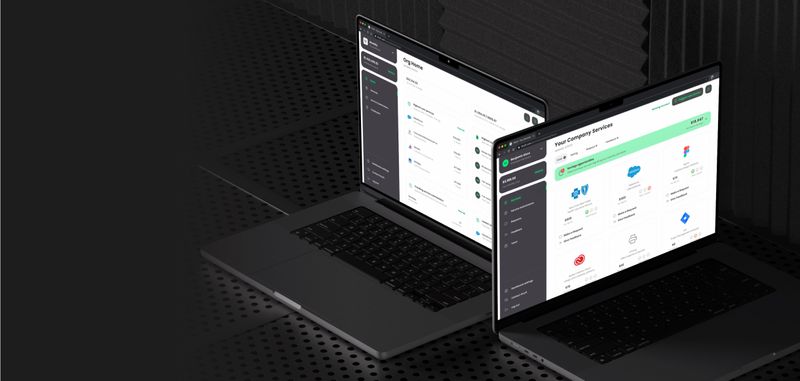
For exceptions that still reached RevOps, the answer was the new admin portal: a rework, not more screens added to the old one. It brought claims work into one place and was the first step toward retiring the old portal.
Claims, clients, providers, payers, work queues, and team performance all sit in one portal, with the agent’s suggestions inside the work instead of beside it. Later layers, like the opportunities and rules in Intelligence, build on the same surface.
“There's no true work queue dashboard. I can't clearly see what actions were taken, how many, what the dispositions were, or what revenue was brought in.”
RevOps manager, stakeholder interview
Benefit verification, rejections, denials, and partial payments needed different entry criteria, columns, and metrics.
Days to the next appointment mattered for benefit verification; claim age and filing deadlines mattered for collections.
Staff needed to correct information, re-verify benefits, and resubmit within Admin, rather than log work performed elsewhere.
Attribute edits to a person, retain an audit trail, and keep human notes separate from system events.
Use current production data, remove resolved items, and surface claims that matched no queue.
Adjust queue rules and ownership without an engineering ticket for every change.
A claim’s history, its status in a list, and the queues that organize the work.
Solution 1
RevOps asked: “Who touched it last, and what did they do?” Before, the only history was a notes log that people kept by hand, and the admin portal had no traceable record of what the system or anyone else had done. I designed a chronological history of system, agent, and human events that brings what was scattered across tools into one timeline, so a specialist can answer that question before taking action.
What it solvedLess investigation time and an audit trail. Specialists stop piecing a claim’s story together from notes and other tools, and every system, agent, and human action is traceable in the admin portal.
Solution 2
In the old admin portal, a single status field was trying to answer three questions: where is this claim, what's wrong with it, and is it still ours? In the new admin portal, I gave each question its own signal and always showed all three together, so a specialist can triage a row without opening it.
What it solvedFaster triage. From the row alone, a specialist can tell where a claim is, what’s wrong with it, and whether it’s still the team’s to work, instead of opening each claim to find out.
Add the original interface crop showing the single status field. Call out the ambiguity between lifecycle state, issue type, and whether the claim was still actionable here.
Solution 3
RevOps supplied the workflow evidence · I revised the queue model
My first concept used one failed-claims queue. Research challenged that model, so I separated work streams and matched their urgency signals to the task: days to appointment for benefit verification; claim age and filing deadlines for collections.
What it solvedWork arrives sorted by who handles it and how urgent it is, so the team no longer maintains its own queue in a spreadsheet, and claims that fit no queue stop slipping through.
Design detailAn “unqueued” view surfaces unmatched claims. A proposed queue builder would let managers adapt the work streams.
Add the first single-queue concept. Annotate the assumption tested: all failed claims could be organized as one stream.
Even perfect submissions can fail. Insurers change their requirements, often without telling us, and a single change can set up a whole batch of claims to fail. Keeping up is ongoing work on our side, in the admin portal, and resolving claims one at a time never stops the next one. I explored linking claims with a shared cause, so RevOps could spot the change once, review a proposed rule, and catch it on future claims. I designed it so a person had to approve every proposed rule before it could affect future submissions, because one incorrect AI recommendation could spread across thousands of claims. The goal: far less effort spent tracking down the cause and cleaning up every claim it touched.
I proposed this future-state interaction · Not deployed

Turning the connected admin workspace I designed into one the team used depended on engineering capacity and integrations. While it waited, the RevOps manager built an AI-assisted dashboard her team could use and change directly.
The team chose the dashboard that met immediate needs. A connected vision alone could not overcome the workspace’s delivery dependencies.
I had scoped the claims workspace and its queues. When the manager built her own dashboard, I treated it as the strongest research signal we had rather than competition. I studied what it covered, what it left out, and where it overlapped with the workspace, then reshaped the plan around it instead of competing with it. That overlap became the basis for a separate internal-tools governance proposal.


The work progressed differently across the service, provider review, and RevOps workspace. When my role ended in a company-wide layoff, this was the state of each.
The engineering lead owned the backend direction. I contributed the operational research and experience design connecting that service to provider and RevOps workflows.
I designed both sides. The provider pod took on implementing and managing prevention, and I kept design ownership of the RevOps experience.
The review pattern was ready for development within the existing submission flow.
The admin workspace was prototyped and tested, but engineering capacity moved to other priorities. Intelligence was prioritized for a future quarter, but had not been deployed.
The brief review created shared understanding, but with no PM on the team, nobody was accountable for turning that direction into a rollout. Next time I'd raise that gap at kickoff and push to name an adoption owner, even an interim one, before the work reaches handoff.
I would establish a named outcome owner, engineering capacity, and a delivery commitment before treating agreement on a vision as a plan.
I would start with a thin slice the operators could use in their current tool, then expand toward the shared experience as the integrations became available.
With claim work scattered across tools and no single trail, there was no reliable “before” number to measure against. Next time I would name a measurement owner at the start and capture a rough baseline early, such as a hand-traced sample of claims or a count of tools touched per resolution, before the new system replaced the old trail.
Email top
top